Set up or add money to my GoDaddy Cash account
If you have a paid product or service, you can set up a GoDaddy Cash account to pay for GoDaddy products.
요구 사항 :
- To start a new GoDaddy Cash account, we require a minimum deposit of USD$100. After your first transfer, the minimum deposit is USD$5.
- 참조 : 고객 번호 필드에 고객 번호를 포함해야합니다. 고객 번호가 포함되어 있지 않으면 계정에 대한 크레딧이 무기한 지연됩니다.
- API 리셀러 의 경우이 고객 번호는 리셀러 제어 센터 대시 보드에 표시되는 상위 계정 번호입니다.
- To set up or add funds to a GoDaddy Cash account, you can either:
- Add funds with an online payment to your GoDaddy Cash account.
- Initiate a wire transfer from your bank to GoDaddy. Here's the information you need for the wire transfer:
수취인 은행 명 : JPMorganChase Bank
은행 주소 : 270 Park Avenue, New York, NY 10017
계정 이름 : GoDaddy.com, LLC
계좌 번호 : 580706823
와이어 라우팅 번호 : 021000021
ACH 라우팅 번호 : 124001545
스위프트 코드 : CHASUS33
참조 : 고객 번호
- After we receive the funds from your bank, the new GoDaddy Cash account appears in your Payment Methods page. If you added funds, the current balance is updated.
Required: If your current balance is more than USD$2000, you must verify your personal or business identity before you can spend the funds. Continue with the next step.
- In your Payment Methods page, select GoDaddy Cash.
- 지금 확인을 선택합니다. 귀하의 개인 또는 비즈니스 신원을 확인하기위한 정보를 제공해야합니다. 참고 : 당사의 파트너 페르소나는 연방 규정 준수 여부를 확인합니다. 자세한 내용은 페르소나 란 무엇인가요?를 참조하세요.
How do I check my GoDaddy Cash balance?
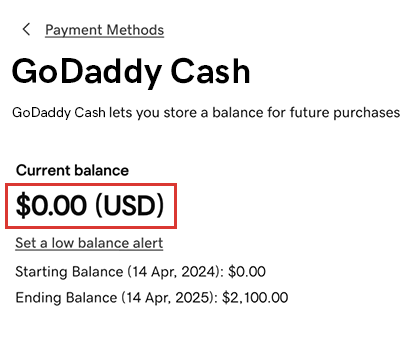
In your Payment Methods page, select GoDaddy Cash. The current balance is shown (in USD) on the GoDaddy Cash card.
상세 정보
- Add another payment method to your account, like a credit card or bank account.
- Return funds from and close my GoDaddy Cash account