Turn on auto-renew for my domain
Turn on auto-renew for your domains registered with GoDaddy to automatically renew your domain before it expires. We'll use the associated payment method to renew your domains on your behalf.
Note: You can cancel domain renewals from the Renewals and Billing page of your account.
- GoDaddy Domain Porfolio(도메인 포트폴리오)에 로그인합니다. (로그인에 도움이 필요하신가요? 사용자 이름 또는 암호를 찾아보세요)
- 도메인 설정 페이지에 액세스하려면 개별 도메인을 선택합니다.
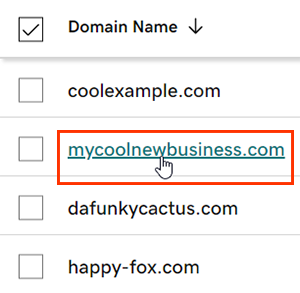
- Next to Auto-renew in the Renew section, switch the toggle to On.
- Select Continue to confirm your consent to automatic billing.
- Domain Protection 가있는 도메인은 특정 작업을 완료하기 위해 ID 확인이 필요합니다. 24 시간 이상 2 단계 인증 (2SV)을 사용 설정 한 경우 SMS를 통해 전송 된 코드를 입력하거나 인증 앱의 코드를 입력합니다. 그렇지 않으면 GoDaddy 계정의 이메일 주소로 전송 된 일회용 암호를 입력하십시오.
계정에 변경 사항이 표시되는 데 최대 90 분이 걸릴 수 있습니다.
관련 단계
- Review your payment methods to avoid problems when we attempt to automatically renew your domain.
상세 정보
- 도메인 및 계정에서 최고의 보안을 위해 2 단계 인증을 설정합니다.
- Safeguard your domain with Domain Protection and prevent issues like accidental expiration and unauthorized domain actions.